Not one parser, but a set of working scenarios
The template covers search, feeds, channels, videos, comments, playlists, posts, downloads and API-key checking from one ZennoPoster interface.
A ZennoPoster template for efficient YouTube data collection, analysis and downloading.
Collect statistics and metadata for videos, channels, playlists, live streams, comments, posts, search results, suggestions, trends, Shorts, contacts and downloadable content in a controlled workflow for ZennoPoster or ZennoBox.
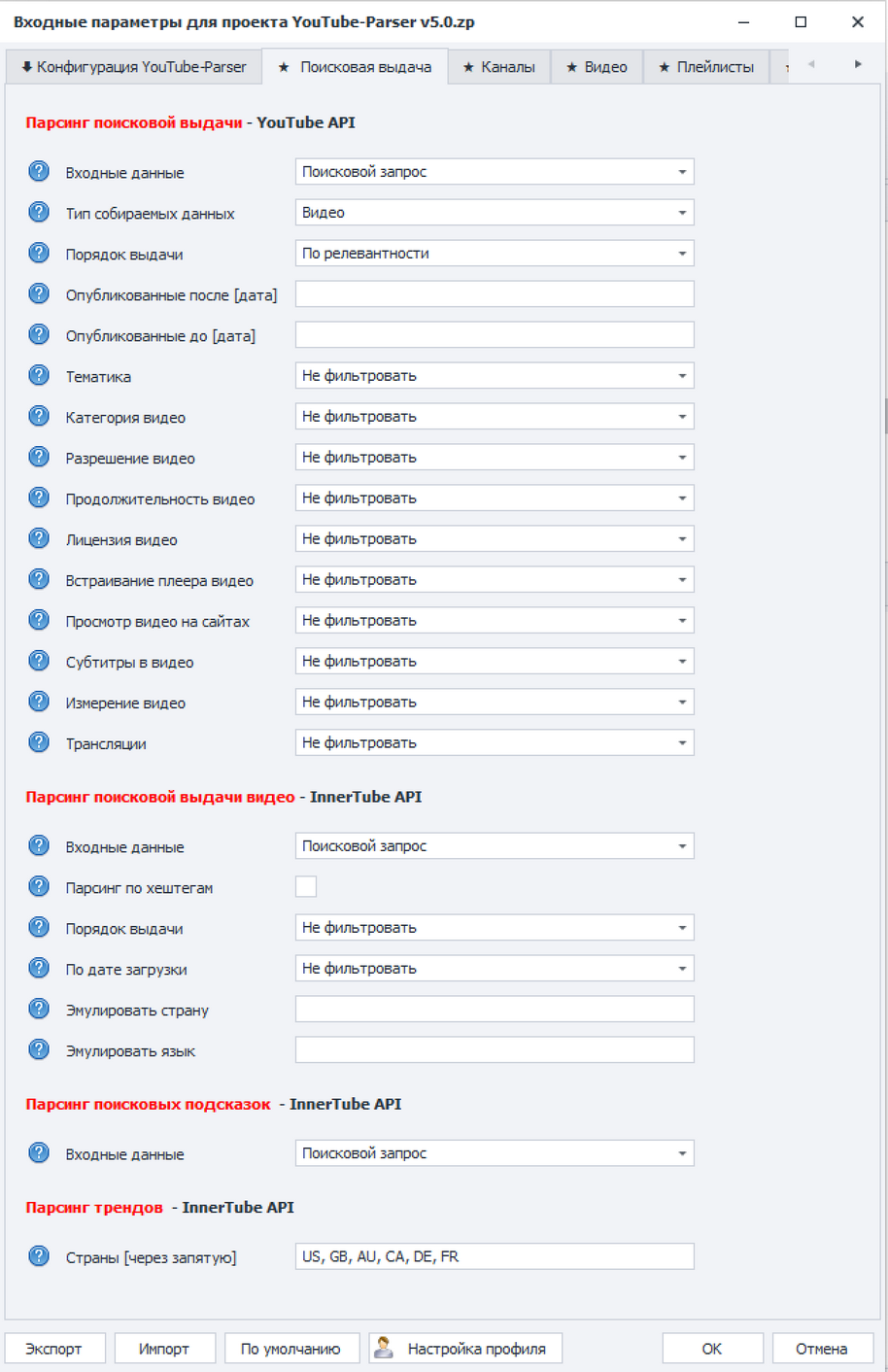
YouTube-Parser is useful when you need more than manually opening dozens of pages: it creates repeatable tables, filters results and downloads public content from different areas of YouTube.
The template covers search, feeds, channels, videos, comments, playlists, posts, downloads and API-key checking from one ZennoPoster interface.
Reports can include metadata, statistics, contacts, social links, comments, subtitles, thumbnails and other public YouTube data.
YouTube API v3 is useful for stable bulk collection, while InnerTube API extends coverage for Shorts, trends, posts, social links and downloading.
Input settings are split into task-focused tabs, and every task uses expected input files. You can quickly switch between search, channels, videos, playlists, posts and downloading.
Open task overviewCollect videos, channels and playlists by search queries, expand keyword lists with suggestions, check country trends and export the Shorts feed.
Collect channel metadata, statistics, subscriptions, emails from descriptions, public social links and filter channels by subscribers, views, year and country.
Parse video metadata, comments, similar videos, playlists, playlist videos, community posts and comments under posts.
Save videos, channels, thumbnails and subtitles to the device, choose quality, stream type, subtitle language and create a table of downloaded content.
Control limits, region, language, proxies, API keys, duplicate removal and structured tables for Excel analysis.
This page is grounded in the current YouTube-Parser documentation, input-settings export, local template description and the provided interface screenshots.
The screenshots show three key product zones: search collection, channel metadata and content downloading through InnerTube API.
YouTube API v3 and InnerTube API filters: data type, sorting, dates, categories, quality, subtitles, live streams, region and language.
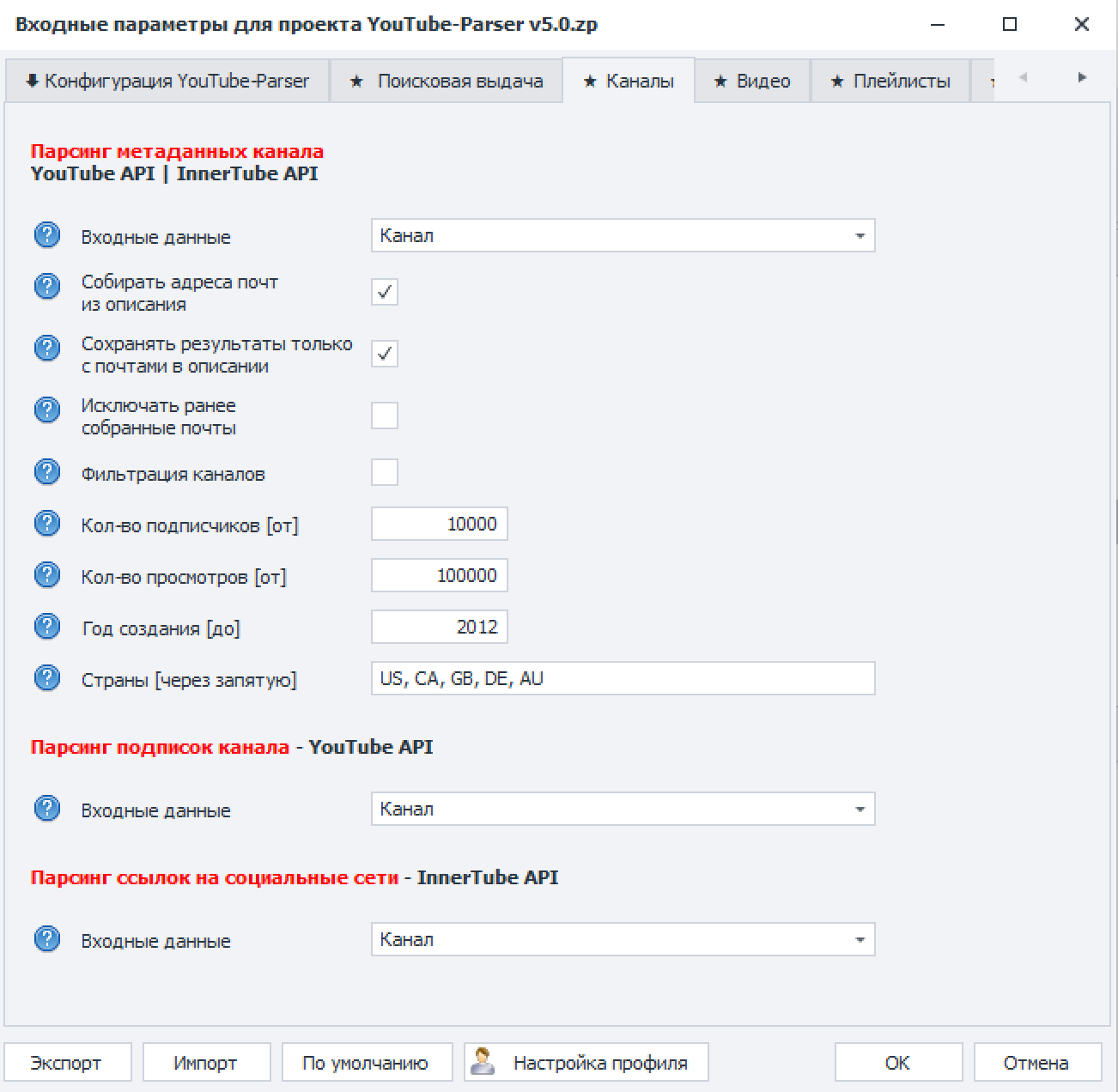
Channel metadata, emails from descriptions, social links, subscriptions and filters by subscribers, views, year and countries.
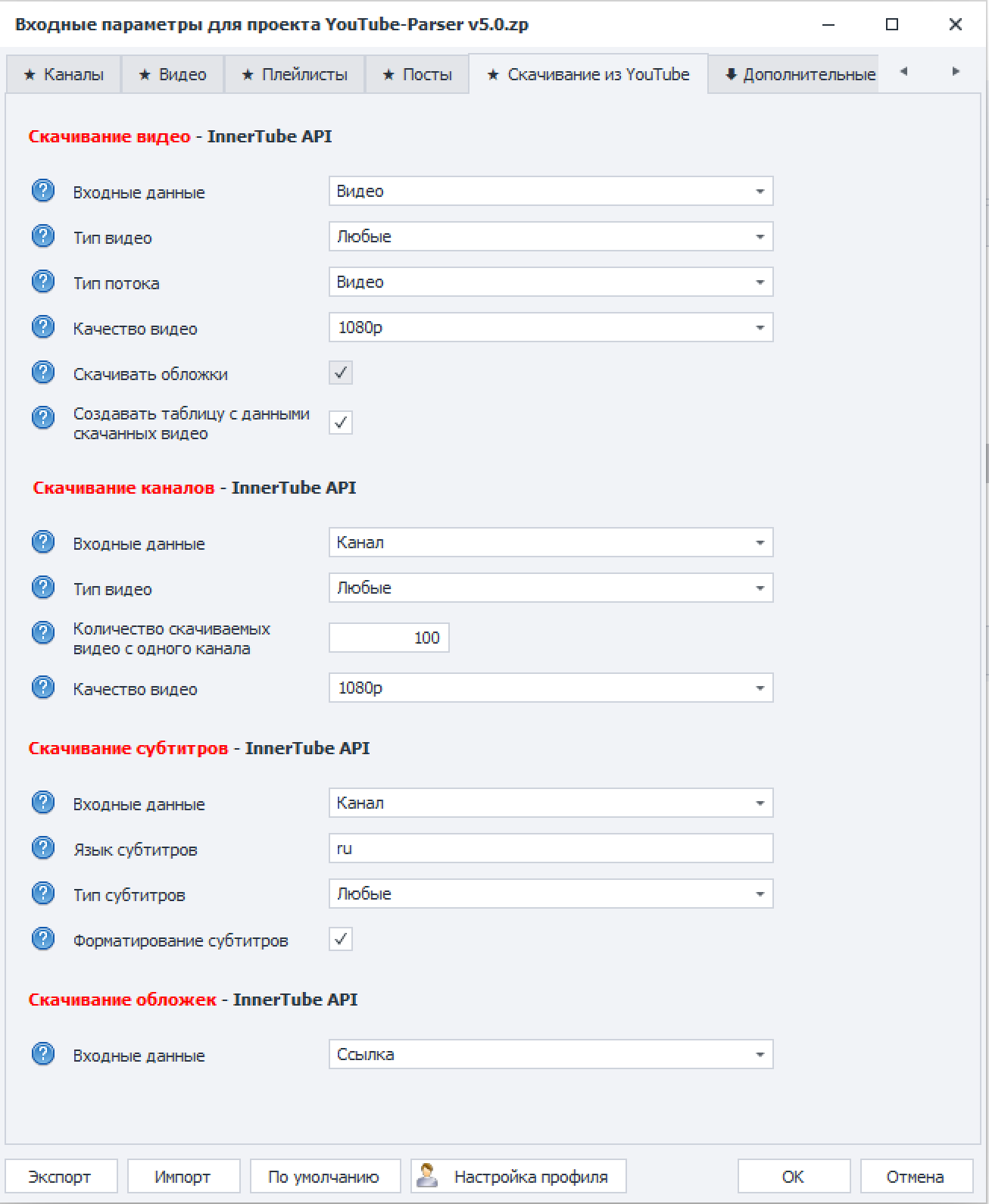
Video, channel, subtitle and thumbnail downloading through InnerTube API with quality, stream, limit and report-table settings.
The value of Parser is not one request to YouTube, but a repeatable sequence: prepare lists, configure the scenario, run collection and review output.
On the configuration tab, select the work method and one scenario: search, channels, videos, comments, playlists, posts, downloads or API checking.
The current run has a clear goalFill the required files: search queries, channels, videos, playlists, posts, thumbnails, API keys or proxies.
The data is in the expected structureSet data type, limits, dates, countries, language, download quality, regex, InnerTube API delay and duplicate handling rules.
Collection matches the task and limitsThe template processes input-list rows, calls the selected API, stores intermediate data and creates the result.
Manual browsing becomes a repeatable processUse Results for Excel analysis, Downloads for downloaded content and reports for further processing or upload workflows.
You have structured output to work withThe product is built for recurring tables, contacts, metadata and materials across large lists, not for looking at a couple of videos once.
For finding topics, expanding semantics, analyzing search results and collecting channels or videos across large query sets.
For collecting public channel contacts, social links, statistics and tables for later filtering.
For exporting subtitles, thumbnails, videos, playlists and studying how competitors package and distribute content.
For repeatable YouTube data collection without building a custom parser, report system and downloader pipeline.
YouTube-Parser runs in a Windows environment through ZennoPoster or ZennoBox. Microsoft Excel is needed for working with result tables and reports.
Short answers about collection methods, contacts, downloads, results, filters and environment.
It is a ZennoPoster template for efficient YouTube data collection and analysis: search results, channels, videos, comments, playlists, posts, trends, Shorts, subtitles, thumbnails and public contacts.
The template supports official YouTube API v3 and InnerTube API. YouTube API v3 is useful for stable bulk collection through API keys, while InnerTube API covers tasks the official API does not expose.
Yes. The template can extract emails from channel descriptions and public social links when the channel owner has published them in available channel data.
It can download videos, audio, channels, thumbnails and subtitles. Video downloads include stream type, quality and per-channel limit settings.
Main results are saved as informative tables in the Results folder. Downloaded files go to Downloads or to a user-defined folder.
Yes. Depending on the task, filters can use data type, dates, views, subscribers, countries, comment text, regex, likes and other parameters.
API keys are required for tasks that run through YouTube API v3. Proxies are mostly relevant for large InnerTube API runs to reduce limitations and captcha risk.
Yes. ZennoPoster is used for editing and development, while ZennoBox is suitable for running the finished product without custom template development.
Read the documentation, check licensing options or contact us directly to choose a YouTube-Parser scenario for your task.