🎞️ Videos and Comments
The Videos tab covers video metadata and comments under videos.
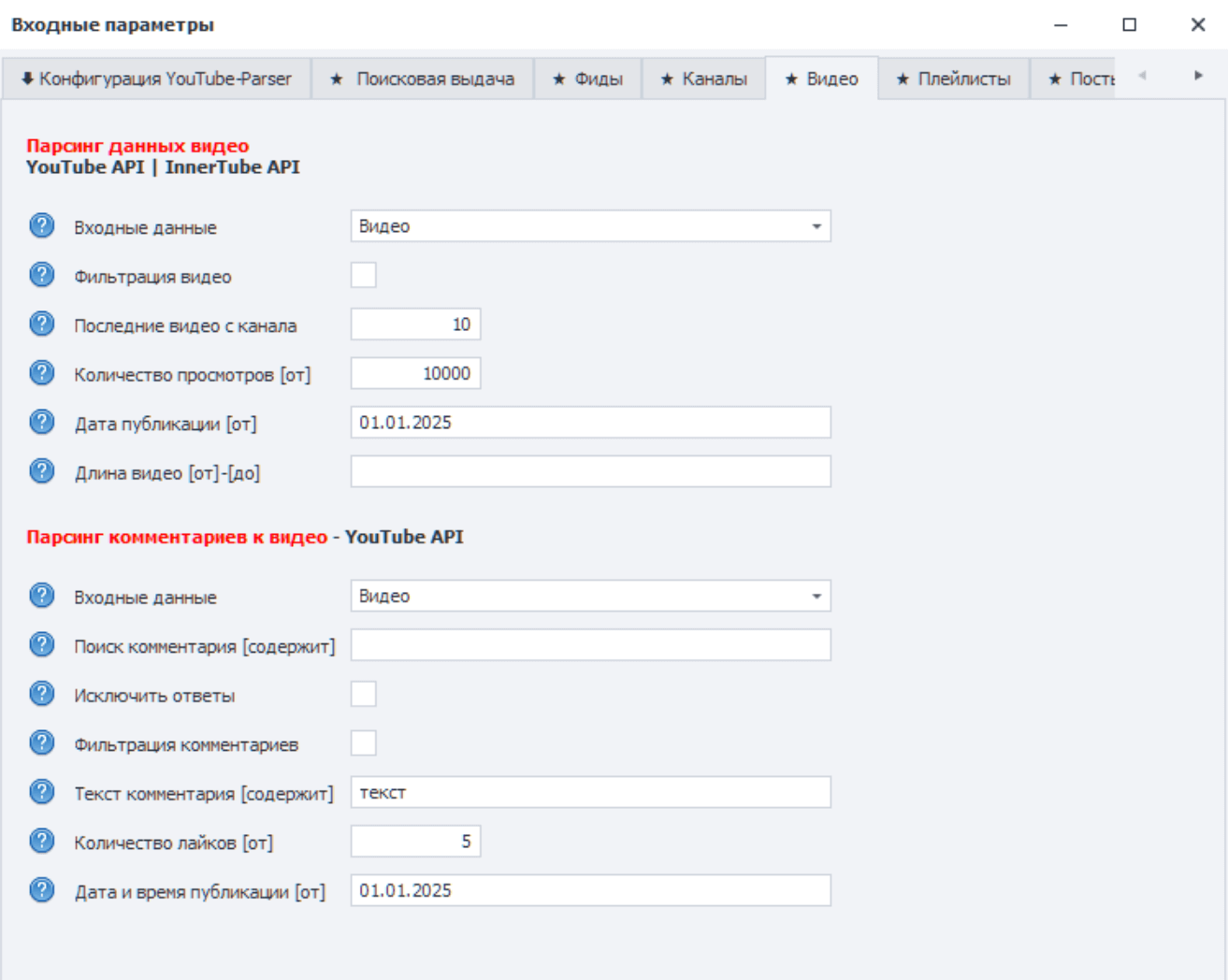
📺 Video Metadata Parsing
The task supports YouTube API and InnerTube API.
Input data:
- Video — URLs from
3_Videos_Urls.txt. - Channel — URLs from
2_Channels_Urls.txt; the template collects videos from channels.
Filtering parameters:
- Video filtering — enables preliminary filtering.
- Latest videos from channel — limits the number of latest videos when Channel is selected as the input data.
- View count [from] — minimum number of views.
- Publication date [from] — lower publication date boundary in
01.01.2024format.
Leave a field empty if the filter is not needed.
💬 Video Comment Parsing
The task works through YouTube API and can use:
- Video — comments are collected by URLs from
3_Videos_Urls.txt. - Channel — comments are collected from channel videos in
2_Channels_Urls.txt.
Available parameters:
- Comment search [contains] — searches for comments with the specified text through YouTube API. This is faster than later filtering, but it does not replace all regex scenarios.
- Exclude replies — saves only top-level comments.
- Comment filtering — enables preliminary filtering.
- Comment text [contains] — text filter with regex support.
- Like count [from] — minimum number of comment likes.
- Publication date and time [from] — lower publication date boundary, for example
01.01.2024 12:00.
Comment filtering is not applied to replies. If replies must be excluded, enable the separate Exclude replies option.
✅ Practical Flow
- To collect specific videos, fill
3_Videos_Urls.txt. - To collect videos or comments from channels, fill
2_Channels_Urls.txt. - Select the source in the input settings.
- Enable filtering only when the criteria are clear in advance.
- Before a large run, test the result on one or two videos or channels.