🧭 YouTube-Parser
YouTube-Parser is a template for collecting data from YouTube and downloading public content. It helps find videos, channels, and playlists by queries, collect channel and video metadata, comments, posts, trends, Shorts, subtitles, thumbnails, and check API keys.
The template works through two methods: YouTube API and InnerTube API. The method is selected in the input settings, but some tasks support only one of them.
Important: this documentation describes client-facing settings, working files, and expected results. API keys, proxies, cookies, license files, service databases, logs, and internal template logic are not disclosed and are not required for normal setup.
⚙️ Configuration and Tasks
YouTube-Parser setup starts from the YouTube-Parser Configuration tab. This is where you select the working method and the single task for the current run.
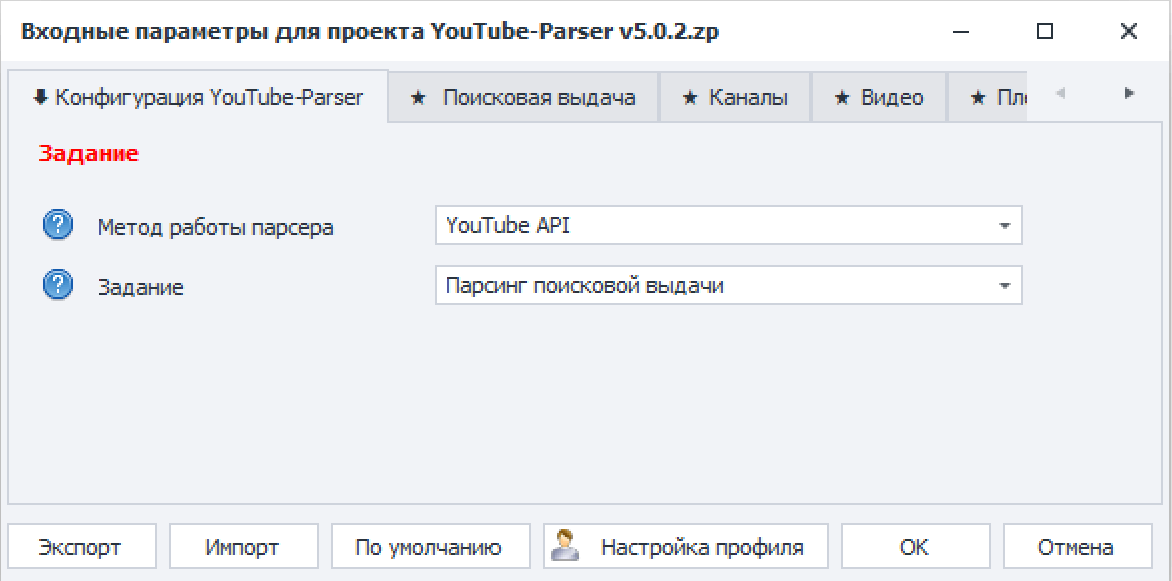
Parser working method
- YouTube API — the official YouTube method. It requires API keys and is suitable for stable large-scale data collection.
- InnerTube API — used for tasks unavailable through YouTube API, as well as for downloading, trends, Shorts, posts, and some additional data.
Task
Only one task is executed at a time. After selecting the task, configure the matching tab and fill the required input file.
Task List
- Search Results Parsing — collects videos, playlists, or channels by search queries.
- Search Suggestions Parsing — collects YouTube suggestions by keywords.
- Trends Parsing — collects trending videos by country and category.
- Shorts Parsing — collects Shorts with the specified limit.
- Channel Metadata Parsing — channel data, statistics, description, and additional fields.
- Channel Subscriptions Parsing — channels subscribed to by the selected channel.
- Social Links Parsing — public links from channel data.
- Video Metadata Parsing — video data by video URLs or channels.
- Comment Parsing — comments under videos.
- Playlist Metadata Parsing — playlist data by playlist URLs or channels.
- Playlist Videos Parsing — videos included in playlists.
- Channel Posts Parsing — channel community posts.
- Post Comments Parsing — comments under community posts.
- Video Downloading — video or audio downloading by videos, playlists, and channels.
- Channel Downloading — downloading videos from channels.
- Subtitle Downloading — downloading subtitles by videos or channels.
- Thumbnail Downloading — downloading previews by thumbnail or video URLs.
- API Key Checker — checks YouTube API keys.
Settings Tabs
- Search Results — YouTube API and InnerTube API search, plus search suggestions. See Search and Feeds.
- Feeds — trends and Shorts. See Search and Feeds.
- Channels — channel metadata, subscriptions, and social links. See Channels.
- Videos — video metadata and video comments. See Videos and Comments.
- Playlists — playlists and playlist videos. See Playlists and Posts.
- Posts — community posts and post comments. See Playlists and Posts.
- Downloading — videos, channels, subtitles, and thumbnails. See Downloading.
- Advanced — API, proxies, region, results, and download folder. See Additional Settings.
- License — license key field.
📁 Main Files
The YouTube-Parser folder uses:
- 1_Search_Keywords.txt — search queries for search results and search suggestions.
- 2_Channels_Urls.txt — channel URLs.
- 3_Videos_Urls.txt — video URLs.
- 4_Playlists_Urls.txt — playlist URLs.
- 5_Posts_Urls.txt — community post URLs.
- 6_Thumbnails_Urls.txt — thumbnail URLs or video URLs for thumbnail downloading.
- [API].txt — YouTube API keys for tasks that use YouTube API.
- [Proxy].txt — proxies for tasks that require or benefit from proxy use.
- Downloads — downloaded videos, subtitles, and thumbnails.
- Results — report tables.
- [Config] — the template service folder.
Each value is entered on a separate line. If a task supports multiple input types, choose the required source on that task's settings tab.
🧭 How to Choose Input Data
- Open the template input settings.
- On the YouTube-Parser Configuration tab, select Task.
- Open the selected task tab and check the Input data field.
- Fill the matching file in the YouTube-Parser folder.
- Enter the license key and additional parameters if needed.
- Run the template.
For example, Search Results Parsing uses search queries from 1_Search_Keywords.txt. For Video Metadata Parsing, you can choose Video or Channel as the source: the first option uses 3_Videos_Urls.txt, while the second uses channels from 2_Channels_Urls.txt.
🔀 Parsing Methods
YouTube API is preferable for tasks supported by the official API: search results, channel metadata, video metadata, playlist metadata, comments, and some related data. API keys are required.
InnerTube API is used where the official API does not provide the required data or is not suitable because of limitations: trends, Shorts, posts, social links, video downloading, subtitle downloading, and some channel or video data. For large runs, proxies may be needed.
✅ Typical Workflow
- Select the working method: YouTube API or InnerTube API.
- Select one task.
- Fill the input file for the selected task.
- Configure filters, limits, region, and additional parameters.
- For YouTube API, check API keys.
- For InnerTube API, enable proxies or request delay when needed.
- Enter the license key.
- Run the template and check the report.
Before a large run, test on a few lines. This helps verify URL format, API key availability, proxy behavior, and the expected report layout.
⚠️ Limitations
- Some tasks work only through YouTube API or only through InnerTube API. The supported method is shown in the settings block header.
- Filters do not turn YouTube-Parser into a search over the whole platform. Most scenarios still require input data: queries, channels, videos, playlists, or posts.
- YouTube limits the number of search results returned for one query. Use multiple search phrases to expand the dataset.
- Before a large run, test the setup on a small list.
📊 Results and Recovery
Results are saved as report tables in the template folder. The report name depends on the selected task: search results, channel metadata, video metadata, comments, playlists, trends, Shorts, or downloaded content.
Video, channel, subtitle, and thumbnail downloads are saved to Downloads unless a custom download path is specified in the input settings.
If execution was interrupted and the final table was not created, check the service database folder inside [Config]. If a database with intermediate results is still present, run YouTube-Parser as a single execution:
How many to do: 1
On such a run, the template attempts to save results from the database and create the report tables.
🔒 File Safety
Do not publish or send these files to third parties without cleanup:
[API].txt;[Proxy].txt;- the
[Config]folder; - license files;
- cookies, logs, and service databases;
- real reports if they contain URLs, emails, or commercial data.